4. Software Activation
You can contact Nokov engineers to obtain the relevant license and dongle.
The XingYing system offers two types of license authorization: dongle and dongle + net verification.
- Dongle Authorization Instructions:
Step 1: Insert the dongle and double-click to run the XingYing software;
Step 2: Insert the USB flash drive containing the License;
Step 3: In the XingYing software, click "Select License File";
.png)
Step 4: Select the License file from the USB flash drive, then fill in the "User", "Mail", and "TelePhone" information, and click "Activate" to successfully activate the software;
.png)
.png)
If the customer needs to use the XingYing software on a different computer, simply repeat the above steps on the new computer.
- Dongle + net Verification Authorization Instructions:
Step 1: Insert the dongle and double-click to run the XingYing software;
Step 2: Insert the USB flash drive containing the License;
Step 3: In the XingYing software, click "Select License File";
Step 4: Select the License file from the USB flash drive, then fill in the "User", "Mail", and "TelePhone" information, and click "Activate" to successfully activate the software;
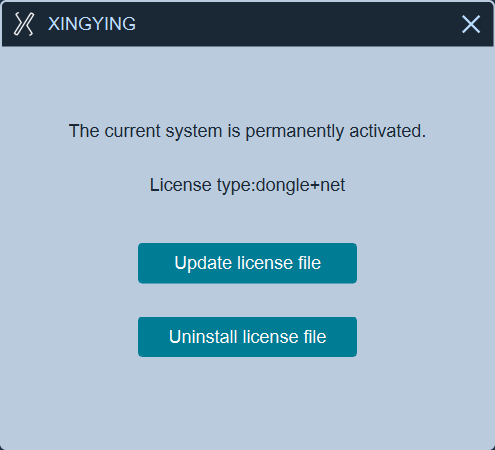
When switching to a new computer, the license must be uninstalled from the previously activated computer before repeating Steps 1–4 on the new computer to reactivate it.
- Once the software has been activated on a computer, you can simply insert the dongle to run the application. There's no necessity to repeat the activation process.
- For your convenience, you can locate the activated License file (original License file name appended with "activated") within the C:\Users\AppData\Roaming\XINGYING directory and then copy it to your USB flash drive. Subsequently, when you use this copied License file to activate other computers, there will be no requirement to re-enter the customer information.
- The dongle License supports parallel use of multiple authorizations. It can automatically switch over when the key expires without manual operation; manual activation is required for first-time use.