(Ⅰ) SDK
Ⅰ. Remote to Raspberry Pi
- SSH to the Raspberry Pi, extract the SDK folder and place it in the Raspberry Pi home directory.

Remote to Raspberry Pi
Ⅱ. Enable SDK
- In the motion capture software data broadcast, select the address on the host that is on the same network segment as the Raspberry Pi. Set the mode to multicast, select global for skeleton coordinates, and enable SDK.
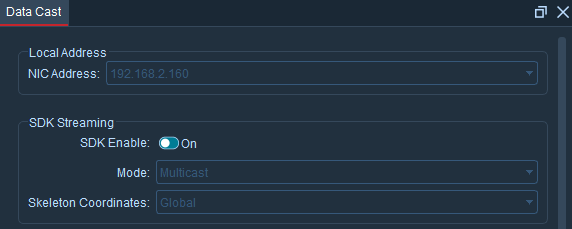
Enable SDK
Ⅲ. Copy Library Files
- Use the following commands to navigate to the bin directory of the SDK file and copy the library files to this path.
cd gcc-linaro-6.3.1-2017.05-x86_64_arm-linux-gnueabihf/bin/
cp ../lib/libnokov_sdk.so ./

Copy SDK Library Files
Ⅳ. Run SampleClient
- Use the following commands to first grant executable permissions and then run the SampleClient file, enter the IP address, which is the address of the motion capture software running on the same network segment as the Raspberry Pi.
chmod +x SampleClient
./SampleClient
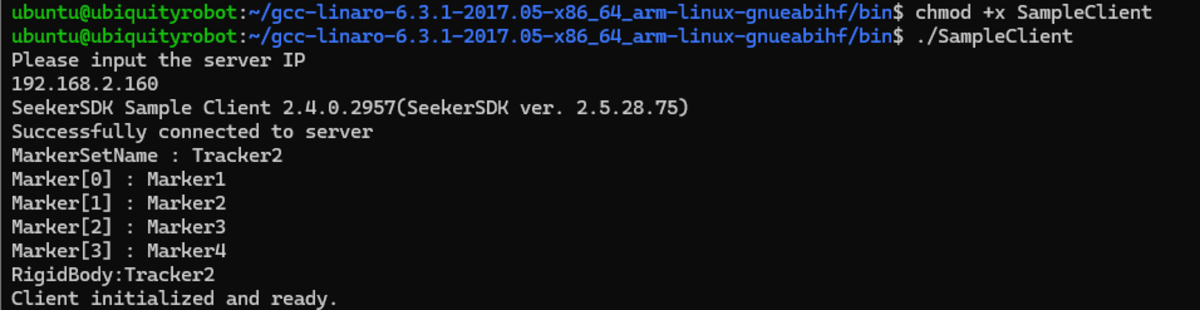
Run SampleClient