Finger Marker Placement Instructions
| Index | Name | Description |
|---|---|---|
| 1 | WristM | Position of the wrist center |
| 2 | WristIn | Inside of the wrist |
| 3 | WristOut | Outside of the wrist |
| 4 | HandOffset | Hand offset point, differentiate left and right hand |
| 5 | FingerThumb1 | Between the palm and the first phalanx of the thumb |
| 6 | FingerThumb2 | Between the first and second phalanx of the thumb |
| 7 | FingerThumb3 | Between the second and third phalanx of the thumb |
| 8 | FingerThumb4 | Tip of the thumb |
| 9 | FingerIndex1 | Between the first phalanx of the index finger and the palm |
| 10 | FingerIndex2 | Between the first and second phalanx of the index finger |
| 11 | FingerIndex3 | Between the second and third phalanx of the index finger |
| 12 | FingerIndex4 | Tip of the index finger |
| 13 | FingerMiddle1 | Between the first phalanx of the middle finger and the palm |
| 14 | FingerMiddle2 | Between the first and second phalanx of the middle finger |
| 15 | FingerMiddle3 | Between the second and third phalanx of the middle finger |
| 16 | FingerMiddle4 | Tip of the middle finger |
| 17 | FingerRing1 | Between the first phalanx of the ring finger and the palm |
| 18 | FingerRing2 | Between the first and second phalanx of the ring finger |
| 19 | FingerRing3 | Between the second and third phalanx of the ring finger |
| 20 | FingerRing4 | Tip of the ring finger |
| 21 | FingerPinky1 | Between the first phalanx of the pinky finger and the palm |
| 22 | FingerPinky2 | Between the first and second phalanx of the pinky finger |
| 23 | FingerPinky3 | Between the second and third phalanx of the pinky finger |
| 24 | FingerPinky4 | Tip of the pinky finger |
Real Finger Marker Point Diagram
.png)
.png)
Marker Application Instructions
1.Refer to the marker placement diagram in Figure 1 above, and attach reflective markers to each joint of the fingers. Special attention shall be paid to the placement position of the handoffset marker: For the left hand: place it beneath FingerIndex1, between FingerIndex1 and WristM; For the right hand: place it beneath FingerRing1, between FingerRing1 and WristM. 2.When initially building the hand model, lay the palm flat within the capture volume (the hand may be rested on a fixed platform for easier model creation). Align all fingers parallel to the positive Y-axis of the global coordinate system (with the Z-axis pointing upward), and keep the thumb naturally abducted. 3. 3 mm markers are adopted for all finger markers.
Joint Description
| No. | Bone Name | Parent Index | Number of Children |
|---|---|---|---|
| 1 | Hand | — | 6 |
| 2 | HandThumb0 | 0 | 3 |
| 3 | HandThumb1 | 1 | 2 |
| 4 | HandThumb2 | 2 | 1 |
| 5 | HandThumb3 | 3 | 1 |
| 6 | HandThumbEnd | — | 0 |
| 7 | HandIndex0 | 0 | 3 |
| 8 | HandIndex1 | 1 | 2 |
| 9 | HandIndex2 | 2 | 1 |
| 10 | HandIndex3 | 3 | 1 |
| 11 | HandIndexEnd | — | 0 |
| 12 | HandMiddle0 | 0 | 3 |
| 13 | HandMiddle1 | 1 | 2 |
| 14 | HandMiddle2 | 2 | 1 |
| 15 | HandMiddle3 | 3 | 1 |
| 16 | HandMiddleEnd | — | 0 |
| 17 | HandRing0 | 0 | 3 |
| 18 | HandRing1 | 1 | 2 |
| 19 | HandRing2 | 2 | 1 |
| 20 | HandRing3 | 3 | 1 |
| 21 | HandRingEnd | — | 0 |
| 22 | HandPinky0 | 0 | 3 |
| 23 | HandPinky1 | 1 | 2 |
| 24 | HandPinky2 | 2 | 1 |
| 25 | HandPinky3 | 3 | 1 |
| 26 | HandPinkyEnd | — | 0 |
Coordinate System Specification
The coordinate systems for each finger joint bone under Model Pose are defined as follows:
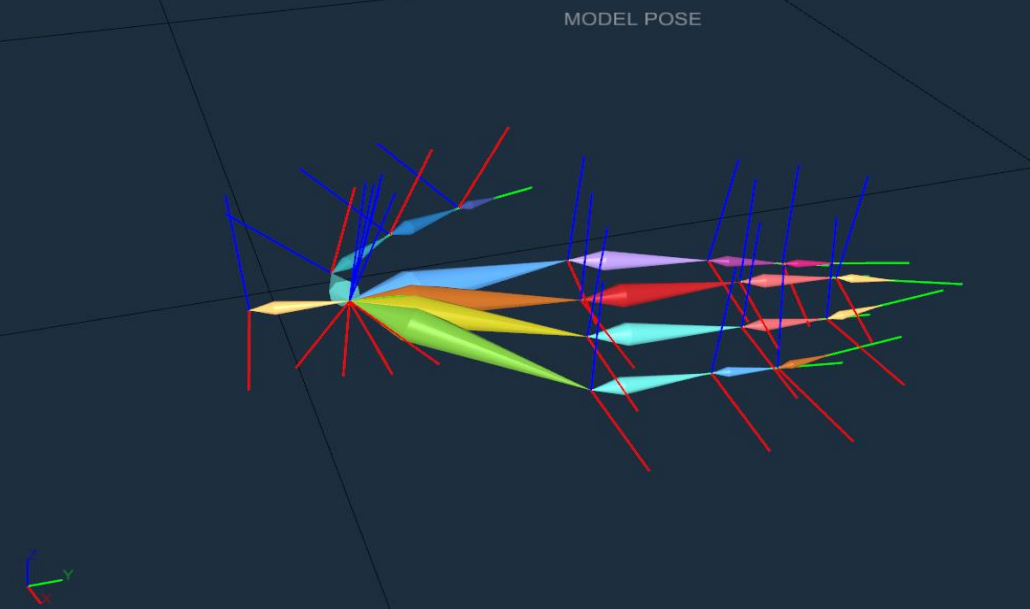
In the initial pose, the coordinate system of the Hand joint is aligned with the motion capture coordinate system. The coordinate systems of all remaining finger joints shall be adjusted according to the actual marker placement, such that the positive Y-axis is parallel to the vector originating from the marker of the current bone and pointing toward the marker of its child joint.